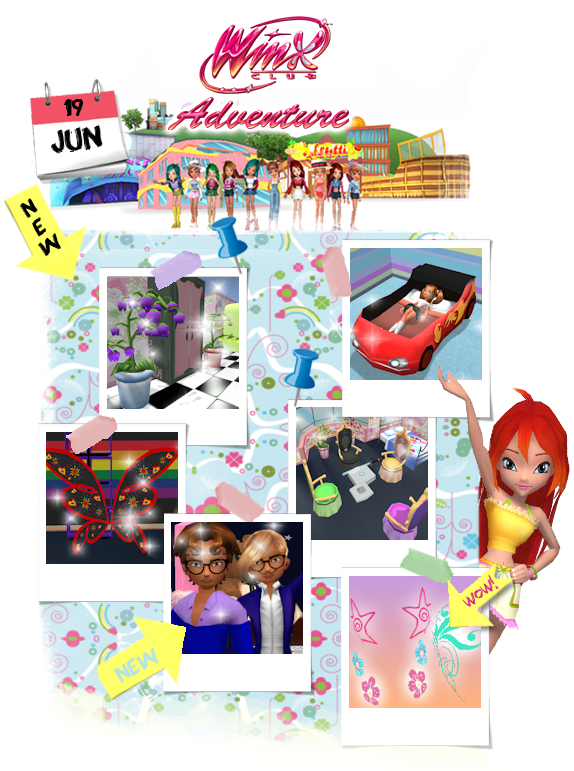
This week marks a major milestone in Winx Adventure with the arrival of a brand new feature available now in-game! Bedroom sharing has arrived in Winx Adventure!
This week’s update includes a brand new way to enjoy your personal room with one of your best friends, regardless of their group!
Biggest updates:
Bedroom Sharing is now officially available! You can now invite one of your friends to share your personal room and become roommates!
Wardrobe item limit has been increased from 80 items to 200 items!
Wardrobe has now a menu where you can filter the content you want to see (e.g. Tops, Headgears, Hairstyles...)
Friend list limit has been increased from 120 friends to 200 friends!
How Bedroom Sharing works:
You can invite one friend to share your bedroom with you. You can't invite more than one friend or share with more than one person at a time.
To share your room, go to your own Personal Room and click the new Share Bedroom button in the top-right corner, next to your player name. Look for the icon with two buddies!
The room of the player who sends the invite is the room that will be shared.
If your friend accepts, they will become your roommate and both of you will be able to use the same shared bedroom.
Both roommates can customize the room together, appear in the same location, and enjoy a bigger bedroom with a room expansion.
Your friend’s original bedroom will be safely stored while the bedroom is shared.
If the bedroom is unshared, your friend will return to their original room from before the share.
Items placed by each player will always belong to their original owner.
If furniture is removed, it will return to the Decorator Inventory of the item’s original owner.
Sharing again with the same user won't bring back the progress they had before and they must start over.
Where can I share my bedroom?
Bedroom Sharing can only be started from your own Personal Room.
You cannot start sharing while visiting someone else’s bedroom.
The Share Bedroom button appears in the top-right corner of your own room, near your player name.
Once your room is already shared, the Share Bedroom button becomes an Unshare Bedroom option instead.
Improvements:
Gardenia's nature has been slightly improved! All butterflies have a brand new look and a more realistic path! Find them near flowers or follow them if you spot them!
The sound effects of moving between water, grass and heels or flats now fades in between each other for a smoother experience.
The sound of footsteps in the bedroom are now with echo.
Bedroom has now background sound effects, like the city.
Pond water's sound effects have been reworked so they aren't loud if you're slightly further away. Now, they get muffled the further you are and are only loud if you're very close to the water!
Thunder lightning effect now comes with a lightning sound effect!
Bug Fixes:
Fixed an issue where players could still send a friend request to someone whose friend list was already full.
Friend requests now correctly check both players’ friend list limits before being sent.
Clicking in yourself in the chat will no longer switch to Whisper tab.
You can no longer Whisper to yourself, writing manually "/w [yourname]" will not send anything.
Fixed fade-in, fade-out while switching soundtracks in personal rooms
Fixed issue with changing locations while having music muted (at 0 volume) would play the Character Selection music instead of the actual scene.
Items' list includes...
Soundtrack "Fly" added to Personal Room
Soundtrack "Forever" added to Personal Room
Soundtrack "Crazy For You" added to Personal Room
Soundtrack "Smooth Business" added to Personal Room
Soundtrack "Spooky Painting" added to Personal Room
Soundtrack "In Town" added to Personal Room
Soundtrack "Welcome to Gardenia" added to Personal Room
Soundtrack "Breathing..." added to Personal Room
Soundtrack "Mambochiwambo" added to Personal Room
Soundtrack "Believix" added to Personal Room
Soundtrack "Winx Are Back" added to Personal Room
Flowers Pink
Flora Green
Flora Pink
Bloom Blue
Bloom Pink
Aisha Blue
Aisha Purple
Side burns Brown
Curly Mustache Brown
Mustache Brown
Goatie with mustache Brown
Goatie Brown
Full Beard Brown
Enchanted Fairy Door Pride
Ringlets
Trendy Wallpaper Purple
Trendy Wallpaper
Tecna Purple
Tecna Pink
Stella Yellow
Stella Orange
Stars Blue
Roxy Paws Pink
Roxy Paws
Musa Purple
Musa Pink
Musical Notes
Nostalgia Pink
Heart Patterns
Pride Black
Pride
Horizontal Flowers Rings
Flowers Rings
Bloom Sky Door
Striped Door Pink
Striped Door Blue
Striped Door Black
Striped Door Orange
Enchanted Fairy Door Orange
Show Door Pink
Show Door Red
Pink Futuristic Door
Blue Futuristic Door
Cyan Futuristic Door
Orange Futuristic Door
Yellow Alfea Door
Blue Alfea Door
Luck Door Green
Luck Door Purple
Royal Door Cyan
Royal Door Pink
Royal Door Blue
Royal Door Purple
Flowery Sunshine Orange
Flowery Sunshine Blue
Sunshine Pink
Sunshine Orange
Sunshine Blue
Endless Sunshine Pink
Endless Sunshine Orange
Endless Sunshine Blue
Garden of Charmix Bell Flowers
Garden of Charmix Bell Flowers Purple
Garden of Charmix Bell Flowers Blue
Garden of Charmix Bell Flowers Black
Garden of Charmix Bell Flowers Pink
Garden of Charmix Bell Flowers Yellow
Car Bed Orange
Car Bed White
Car Bed Red
Car Bed Pink
Car Bed Green
Car Bed Blue
Volume Patterns Purple
Volume Patterns Pink
Volume Patterns Orange
Volume Patterns Green
Volume Patterns Black
Music Lover Purple
Music Lover Pink
Music Lover Orange
Music Lover Green
Music Lover Black
Heart Scales Yellow
Heart Scales Pink
Heart Scales Green
Heart Scales Blue
Heart Scales Black
Summer Paintings Pink
Summer Paintings Orange
Summer Paintings Blue
Summer Paintings Black
Flowery Sunshine Pink
Starstruck Pink
Starstruck Orange
Starstruck Green
Starstruck Blue
Starstruck Black
Peace Splatter Red
Peace Splatter Pink
Peace Splatter Green
Peace Splatter Blue
Peace Splatter Black
Shining Stars White
Shining Stars Pink
Shining Stars Orange
Shining Stars Green
Shining Stars Black
Full Volume Purple
Full Volume Pink
Full Volume Orange
Full Volume Green
Full Volume Black
Wall Divider Glass
Wall Divider Nature
Pride Believix Wings Blue
Pride Believix Wings
Pride Believix Wings Red
Pride Believix Wings Black
Specialist Weapon Stand White
Specialist Weapon Stand Purple
Specialist Weapon Stand Pink
Specialist Weapon Stand Orange
Specialist Weapon Stand Green
Specialist Weapon Stand Blue
Specialist Weapon Stand Black
Princess Crown Bed White
Princess Crown Bed Red
Princess Crown Bed Purple
Princess Crown Bed Pink
Princess Crown Bed Green
Princess Crown Bed Blue
Princess Crown Bed Black
Royal Chair White
Royal Chair Purple
Royal Chair Pink
Royal Chair Orange
Royal Chair Green
Royal Chair Blue
Royal Chair Black
All the above changelist information can also be found in Forums. If you have any questions, please also visit our FAQ site by clicking on the FAQ section under Community.
If you have any suggestions or bugs to report, please write to us by clicking on the Community section under Bug Report on the Winx Club Online homepage!
Please note that a lot more exciting content will continue to be added to the game in future updates.
We use cookies or similar technologies for technical purposes and, with your consent, for experience and ways to keep things you did saved, such as images, poll votes and even your web avatar images, as specified in the Privacy Policy.
We use cookies or similar technologies for technical purposes and, with your consent, for experience and ways to keep things you did saved, such as images, poll votes and even your web avatar images, as specified in the Privacy Policy.
You can freely give, deny, or withdraw your consent at any time by accessing the preferences panel. If you give consent, it will be valid only in this domain. Denying consent won’t change anything, but you may need to log in more often and get bigger loading times when reloading the same page.